



Heylo: How to join our community
Welcome to the Outdoor Swimmer members-only community. As part of your membership, you get access to our closed community space on Heylo — a dedicated app where you can connect with other swimmers, join events, ask questions, and make the most of your membership benefits.
Follow this quick guide to get started.
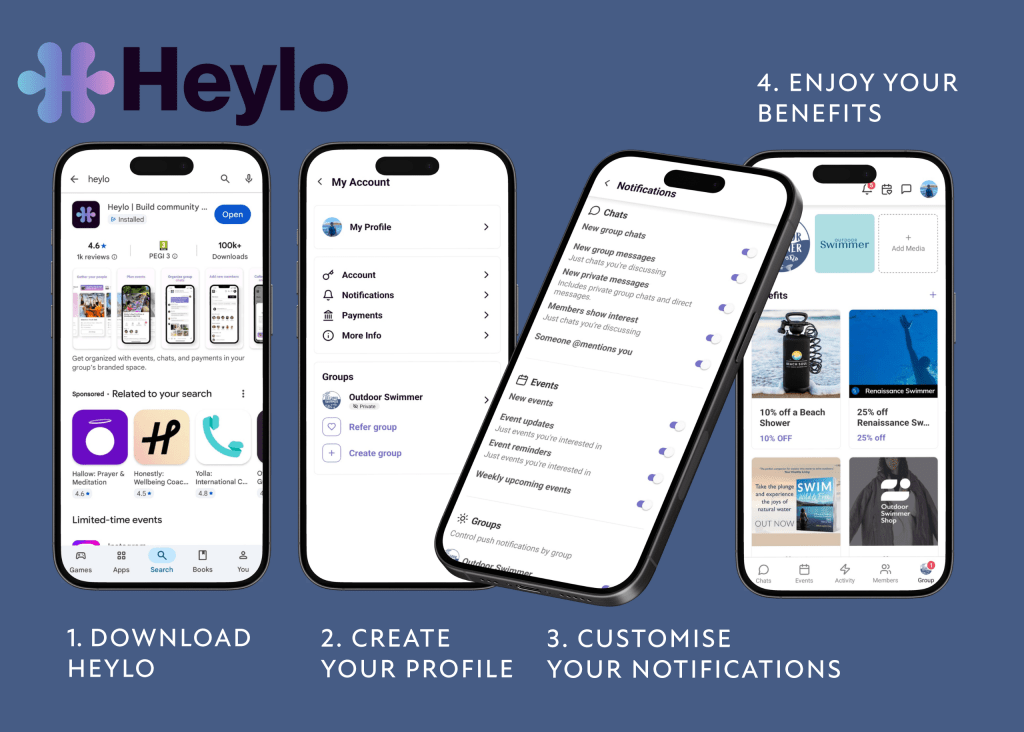
1. Download the Heylo App
Heylo is free and works on iOS and Android. Follow this link or use the instructions below.
- iPhone/iPad: Search for ‘Heylo’ in the App Store
- Android: Search for ‘Heylo’ in Google Play
- Tap Install and open the app once it’s downloaded.
2. Create Your Heylo Account
- Open the app.
- Sign up using your email, Apple ID, or Google account.
- Add your name and profile photo (optional)
3. Join the Outdoor Swimmer Community
You can join our group in two ways:
a. Using Your Invite Link
Click this link to automatically open Heylo and take you straight to our group. Tap ‘join group’.
b. Scanning the Outdoor Swimmer QR Code
Scan the QR code in our most recent issue of Outdoor Swimmer.
- Open Heylo.
- Tap the QR code scanner (top‑right corner).
- Point your camera at the Outdoor Swimmer QR code.
- Tap Join Group.
4. Confirm Your Membership
Because our Heylo community is for members only, you may be asked to confirm:
- Your membership level and number
- Your email address
- A couple of questions about your swimming interests
This helps us keep the group safe, friendly, and relevant.
Once completed, we will approve your access.
5. Explore Your Outdoor Swimmer Community
Inside the Heylo community, you can:
- Read announcements from the Outdoor Swimmer team
- Join chats with fellow swimmers
- Sign up for free swims and events
- Take part in the monthly free swim draw
- Access membership perks
- Ask questions, share stories, and connect with other members
6. Update Your Notification Settings
To make sure you don’t miss free swim announcements, event releases, or news:
- Go to Settings in Heylo
- Tap Notifications
- Enable alerts for posts, comments, and events. You can turn these off and on at any time.
7. Say Hello!
Once you’re in, feel free to introduce yourself in the Welcome Chat.
Tell us where you swim, what you love about outdoor swimming, or your next chilly dip — the community is warm, even when the water isn’t!